post / July 30, 2017
Definitive Guide To Cognitive Automation Software Capabilities
A guide to cognitive automation software capabilities.
Confused by all RPA vendors claiming they have cognitive automation? This articles give you a list of key capabilities, explains why they are important, and gives you a list of questions to ask to judge if the vendor claims are true.
Important note on "Faux AI". "AI-washing" claims - instances where rudimentary functionality or functionality unusable by end-users is passed for AI tech - have done much to hurt adoption of cognitive automation. When using this list, pay special attention to what degree given capabilities are present, if they are native or merely provide integration to 3rd parties, and if these capabilities are usable by business users (vs only by professional services of the vendor).
CRITICAL COGNITIVE AUTOMATION CAPABILITIES
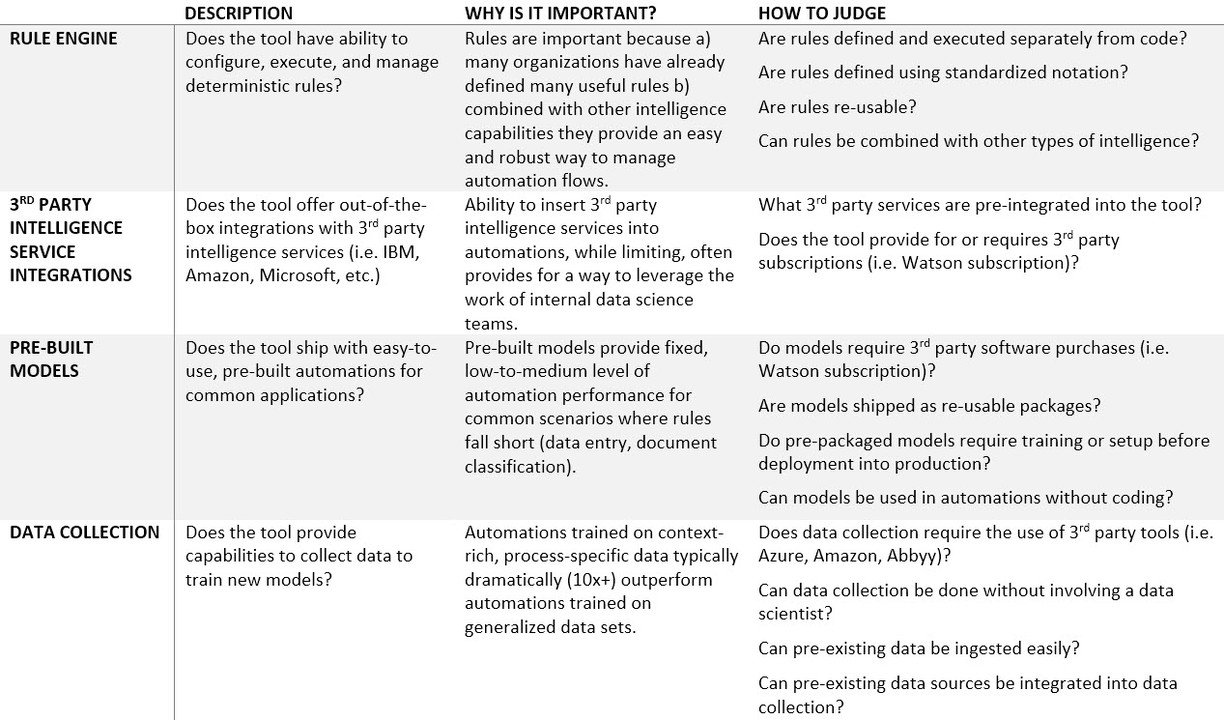
RULE ENGINE
Does the tool have ability to configure, execute, and manage deterministic rules?
Why is it important? Rules are important because a) many organizations have already defined many useful rules b) combined with other intelligence capabilities they provide an easy and robust way to manage automation flows.
Questions to ask:
- Are rules defined and executed separately from code?
- Are rules defined using standardized notation?
- Are rules re-usable?
- Can rules be combined with other types of intelligence?
3rd PARTY INTELLIGENCE SERVICE INTEGRATIONS
Does the tool offer out-of-the-box integrations with 3rd party intelligence services (i.e. IBM, Amazon, Microsoft, etc.)?
Why is it important? Ability to insert 3rd party intelligence services into automations, while limiting, often provides for a way to leverage the work of internal data science teams.
Questions to ask:
- What 3rd party services are pre-integrated into the tool?
- Does the tool provide for or requires 3rd party subscriptions (i.e. Watson subscription)?
PRE-BUILT MODELS
Does the tool ship with easy-to-use, pre-built automations for common applications?
Why is it important? Pre-built models provide fixed, low-to-medium level of automation performance for common scenarios where rules fall short (data entry, document classification).
Questions to ask:
- Do models require 3rd party software purchases (i.e. Watson subscription)?
- Are models shipped as re-usable packages?
- Do pre-packaged models require training or setup before deployment into production?
- Can models be used in automations without coding?
DATA COLLECTION
Does the tool provide capabilities to collect data to train new models?
Why is it important? Automations trained on context-rich, process-specific data typically dramatically (10x+) outperform automations trained on generalized data sets.
Questions to ask:
- Does data collection require the use of 3rd party tools (i.e. Azure, Amazon, Abbyy)?
- Can data collection be done without involving a data scientist?
- Can pre-existing data be ingested easily?
- Can pre-existing data sources be integrated into data collection?
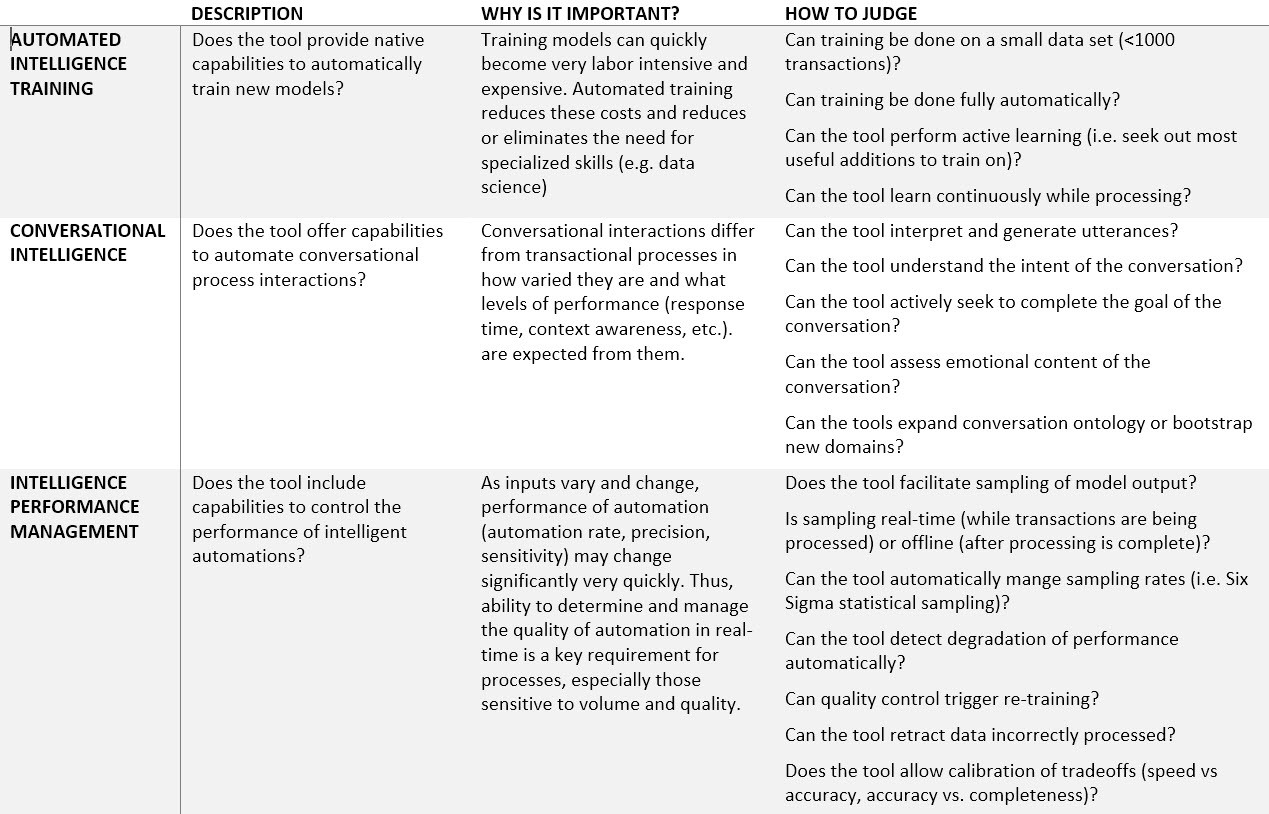
AUTOMATED INTELLIGENCE TRAINING
Does the tool provide native capabilities to automatically train new models?
Why is it important? Training models can quickly become very labor intensive and expensive. Automated training reduces these costs and reduces or eliminates the need for specialized skills (e.g. data science)
Questions to ask:
- Can training be done on a small data set (
Originally published on LinkedIn.